


React Data Grid for
Enterprise Applications
A React data grid is a high--performance UI component for displaying, editing, sorting, filtering, and managing large datasets in React applications. The Ignite UI for React Data Grid supports virtualization for millions of rows, Excel-style filtering, keyboard navigation, accessibility compliance, real--time data binding, and enterprise features like grouping, pinning, and export.
- Millions of rows without DOM bloat
- Performance architecture


Why Enterprise Teams Need More Than a Basic React Table
Lightweight table libraries like TanStack Table or react-table work well for simple, read-only data—product listings, user directories, or settings panels with a few hundred rows. They are flexible, headless, and give developers full control over rendering. For many applications, that is the right choice.
But enterprise applications hit limits quickly. Financial dashboards stream thousands of updates per second. Admin panels need inline editing with validation and rollback. Analytics tools let users pivot, group, and export datasets that can exceed a million records. Procurement teams require WCAG 2.1 AA compliance and keyboard-only navigation before signing off on a component.
When teams reach for a basic table library and start bolting on virtualization, editing, keyboard navigation, and accessibility one plugin at a time, the integration cost and maintenance burden often exceed the cost of adopting a purpose-built data grid from the start. A data grid provides these capabilities as a cohesive, tested unit—not a collection of loosely coupled plugins.
Development Teams Choose Ignite UI for React When They Need To:

60fps Scrolling
Display and scroll through thousands to millions of rows without DOM bloat

Editing with Validation
Support cell and row editing with validation and transactional updates

Keyboard Navigation
Maintain full keyboard navigation and screen reader accessibility
Consistent Behavior
Build dashboards, admin panels, and data-heavy applications with consistent behavior
How Does Ignite UI Compare to Other React Grids?
The Ignite UI for React grid competes most often against AG Grid, MUI X Data Grid, Telerik UI for React, and DevExpress React Grid. The main differences come down to breadth of built-in features, licensing gates, and whether you need a full component suite around the grid.
| Feature | Ignite UI | AG Grid | MUI X | Telerik | DevExpress |
|---|---|---|---|---|---|
| Virtualization | Row + Column | Row + Column | Row only | Row only | Row only |
| CORE FEATURES | |||||
| Cell / Row Editing | ✔ Built-in | ✔ Built-in | Community: read-only | ✔ Built-in | ✔ Built-in |
| Grouping + Summaries | ✔ | ✔ | Premium only | ✔ | ✔ |
| Tree Grid | ✔ | ✔ | Premium only | ✔ | Limited |
| Hierarchical Grid | ✔ (unique) | ✘ | ✘ | ✘ | ✘ |
| Keyboard Navigation | Full WCAG 2.1 | Full | Partial | Full | Full |
| Excel Export | ✔ Built-in | ✔ Built-in | Premium only | ✔ Built-in | ✔ Built-in |
| TypeScript | ✔ First-class | ✔ First-class | ✔ First-class | ✔ | ✔ |
| ECOSYSTEM & LICENSING | |||||
| UI Component Suite | 60+ components | Grid only | MUI ecosystem | 100+ components | 65+ components |
| Low-Code Builder | ✔ App Builder | ✘ | ✘ | ✘ | ✘ |
| Licensing | Simple per-dev | Community + Enterprise tiers | Community + Premium | Per-dev | Per-dev |
For a full methodology and detailed analysis, see the Best React Data Grid: Enterprise Comparison Guide. For AG Grid—specific evaluation, see AG Grid Alternative for React.
Where the Ignite UI for React grid stands out: it is the only grid in this comparison that offers both tree grid and hierarchical grid patterns, ships with a low-code App Builder for rapid prototyping, includes a shipping AI toolchain (Agent Skills + CLI MCP + Theming MCP) for use with Copilot, Cursor, and Claude, and is part of a 60+ component suite—so teams adopting the grid also get charts, editors, layouts, and scheduling components with consistent theming and API conventions. AG Grid is grid-only; MUI X gates key features behind a premium license; Telerik and DevExpress offer broad suites but lack the App Builder workflow.
What Are the Key Features of the Ignite UI React Data Grid?
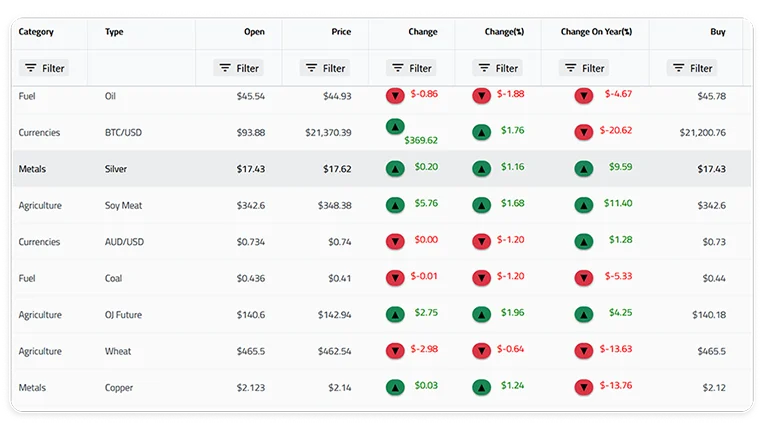
High-Performance Virtualization
The grid renders only the rows and columns visible in the viewport, keeping DOM size constant regardless of dataset size. Teams routinely load one million or more records with smooth 60fps scrolling and instant scroll-position restoration.
Both row and column virtualization are supported—a key distinction from grids that only virtualize rows. In wide datasets with dozens of columns (common in financial and scientific applications), column virtualization prevents horizontal rendering overhead that degrades scroll performance. The grid also supports variable row heights, deferred scrolling for extreme dataset sizes, and cell-level rendering optimization that minimizes React reconciliation cycles.
Common use cases: real-time monitoring dashboards, financial trading blotters, CRM admin panels, and IoT sensor data displays where users need to navigate datasets that would overwhelm a standard HTML table.

Sorting, Filtering, and Grouping
Multi-column sorting, Excel-style advanced filtering, and row grouping with summary aggregations are built in. Users can combine these interactively—group by region, sort by revenue within each group, then filter to a specific date range—without any custom code.
Grouped views include collapsible headers with automatic count, sum, average, min, max, and custom aggregate functions. Filter UIs support both simple dropdown selection and advanced condition builders (contains, starts with, greater than, between, custom predicates). Column pinning lets users lock key identifier columns while scrolling horizontally through wide datasets.

Editing and Data Interaction
Cell-level and row-level editing with built-in validation, undo support, and transactional commit/discard workflows. The grid exposes editing events at each stage—entering edit mode, validating input, committing changes—so teams can integrate with backend APIs, optimistic updates, or approval workflows.
Batch editing allows users to make multiple changes across rows and submit them as a single transaction, reducing API round-trips and giving users a familiar spreadsheet-like experience. The grid also supports clipboard operations (copy, paste, cut across cell ranges) and Excel export with formatting preserved, which is critical for teams that move data between grid-based applications and spreadsheets.

Keyboard Navigation and Accessibility
Full keyboard navigation across cells, rows, groups, and editors. Users can tab into the grid, arrow through cells, enter edit mode, apply filters, and navigate grouped/expanded sections entirely without a mouse. Focus management follows WAI-ARIA grid patterns so assistive technology users get the same workflow as mouse users.
ARIA roles and live regions provide screen reader support that meets WCAG 2.1 AA requirements. Enterprise procurement teams increasingly require accessibility compliance as part of vendor evaluation—the Ignite UI grid is built to pass Section 508 and VPAT audits without aftermarket workarounds or custom ARIA overlays.

Hierarchical and Tree Grid
Most grids offer either a tree grid or a flat grid. Ignite UI for React supports both: a tree grid for single-hierarchy expandable rows (org charts, file systems, category taxonomies) and a hierarchical grid for nested master-detail relationships (orders → line items → shipments, or accounts → contacts → activities).
Supporting both patterns in a single library is a meaningful differentiator—few competitors offer both patterns in the same component library. Teams that need to represent relational data structures visually can do so without building custom expand/collapse logic or managing nested data grid instances manually. Both grid types share the same API conventions, so developers who learn one can apply the same patterns to the other.
Getting Started in 60 Seconds
Install the grid package and render your first data grid in three steps:
npm install igniteui-react-grids igniteui-react
import { IgrGrid } from "igniteui-react-grids";

<IgrGrid dataSource={data} autoGenerateColumns={true} />

Comparing React data grids?
Build Grid Pages with AI — Skills + MCP
Ignite UI for React ships an AI toolchain that grounds GitHub Copilot, Cursor, Claude Desktop, Claude Code, and JetBrains AI Assistant in the correct IgrGrid component APIs, import paths, and design tokens. The toolchain has three independently usable layers, all installable from npm:

Agent Skills
Developer-owned instruction packages (igniteui-react-components, igniteui-react-customize-theme, igniteui-react-optimize-bundle-size) that teach the AI assistant the canonical IgrGrid patterns for your project. Discoverable from the cross-tool .agents/skills/ directory.
Ignite UI CLI MCP
A Model Context Protocol server that exposes project scaffolding, component generation, and documentation queries to the AI agent. Launch with npx igniteui-cli mcp.

Ignite UI Theming MCP
A second MCP server that gives the agent access to design tokens, palette generation, typography, elevations, and WCAG AA contrast validation. Launch with npx igniteui-theming igniteui-theming-mcp.
One-command setup wires all three layers into VS Code:
npx igniteui-cli ai-config
For Angular projects, use ng generate @igniteui/angular-schematics:ai-config to additionally register the @angular/cli MCP server. With the toolchain connected, ask the agent in natural language:
“Add a grid page to this project with sample financial data, Excel-style filtering, and summary aggregations.”
The agent uses the CLI MCP to scaffold the page, the Skills to apply the canonical IgrGrid + IgrColumn patterns and theme imports, and the Theming MCP to honor your design tokens. Both MCP servers connect to any MCP-compatible AI client over STDIO transport.
FAQs About React Data Grid
Frequently Asked Questions about Ignite UI for React
Is Ignite UI for React already included in my Infragistics subscription?
Yes. If your organization has an Infragistics Ultimate subscription, React is already included. There's no new procurement process — just activate it and start building.
What is the MCP toolchain and why does it matter?
MCP (Model Context Protocol) servers give your AI coding assistants ground-truth access to Ignite UI's real component APIs, design tokens, and patterns. Instead of hallucinating outdated or incorrect code, tools like GitHub Copilot and Cursor generate production-ready code that actually works with Ignite UI.
Which AI coding assistants work with Ignite UI's MCP toolchain?
The MCP toolchain supports GitHub Copilot, Cursor, Claude Code, JetBrains AI, and Windsurf. The CLI MCP server and Theming MCP server run locally on your machine, so your code and design tokens never leave your environment.
Can I use Ignite UI for React with my existing React codebase?
Absolutely. Ignite UI for React is a component library that drops into any React project. Bring your own state management, routing, and forms — we integrate with Redux, React Router, React Hook Form, and everything else in the React ecosystem.
How do I get started with Ignite UI for React and the MCP toolchain?
Install Ignite UI for React via npm, then run the Ignite UI CLI command to configure the MCP servers. The CLI registers the servers with your AI assistant's config file automatically. Full setup takes under 5 minutes.
Does the Ignite UI Data Grid support virtualization for large datasets?
Yes. The Ignite UI React Data Grid supports row virtualization for millions of rows, column virtualization, real-time data binding, Excel-style filtering, grouping, pinning, sorting, and export — all with keyboard navigation and accessibility compliance built in.
Is Ignite UI for React compatible with TypeScript?
Yes. Ignite UI for React is TypeScript-first with full type definitions for every component, prop, and API. You get IDE autocomplete, compile-time type safety, and better refactoring support out of the box.
Can I use the same design tokens across Angular, Blazor, and React?
Yes. Ignite UI's theming system is shared across all frameworks. Define your design tokens once (colors, typography, spacing) and the Theming MCP server generates framework-specific implementations for Angular, Blazor, Web Components, and React from the same source of truth.